Direct Image Links vs Regular Links: What’s the Difference and When to Use Each

Sheenam Middha
Writer
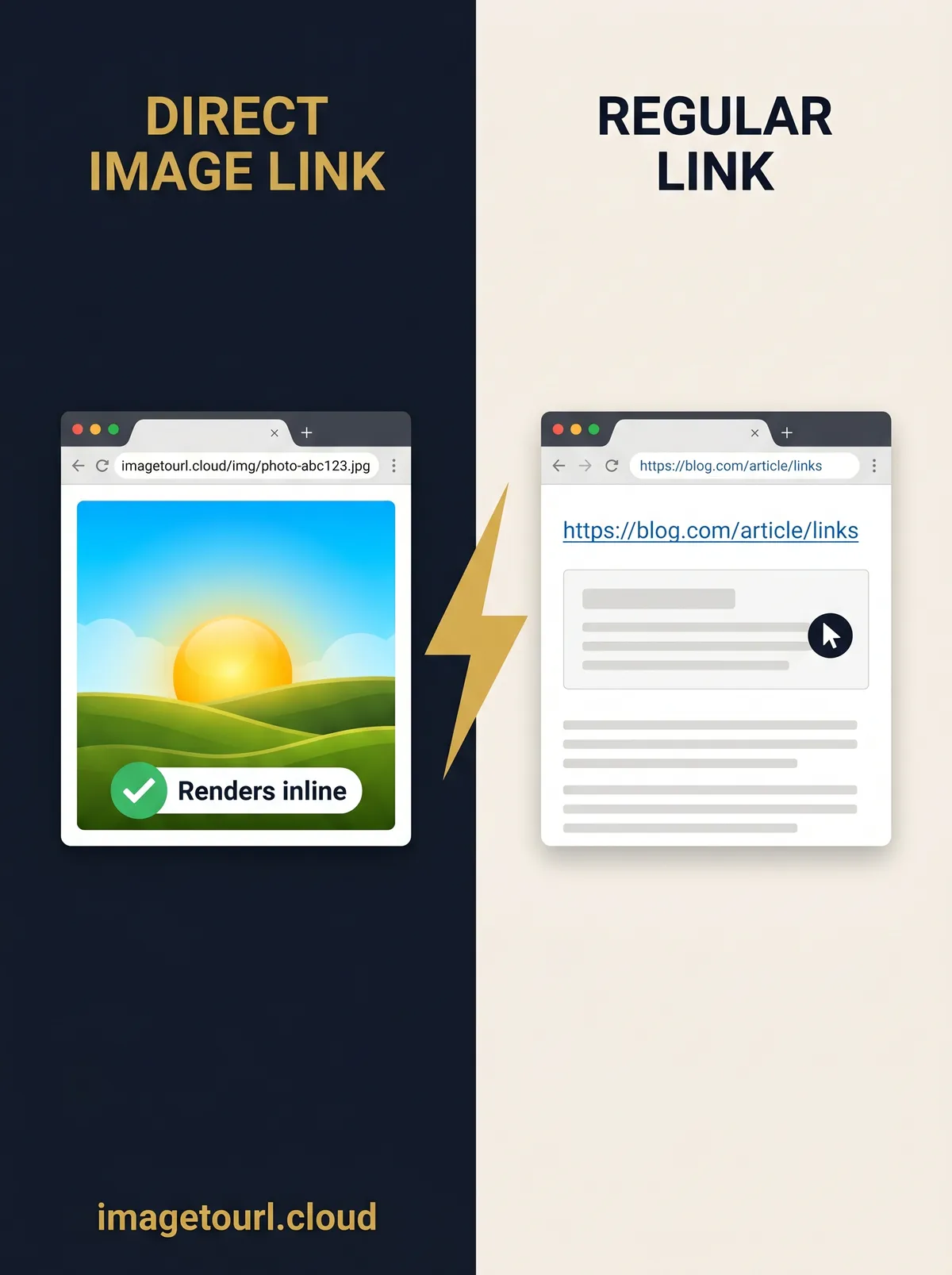
Table of contents
Not all image links work the same. Some links open your image instantly, while others take you to a page full of ads and extra clicks. This small difference can affect how your images load on blogs, emails, forums, and apps.
In this guide, you’ll learn the difference between direct image links and regular image links, when to use each one, and how ImageToURL.cloud helps you create clean, direct image URLs in seconds—no sign-up needed.
What Is a Regular Image Link?
A regular image link is a URL that takes users to a webpage where the image is displayed, instead of opening the image file directly. When someone clicks on it, they are taken to a page that may include ads, social sharing options, comments, or a full image viewer.
Platforms like Imgur and ImgBB provide these links by default. While they work fine for simple sharing, they can create problems when you try to embed images on blogs, websites, or apps.
Example of a Regular Link
A regular image link usually looks something like this: https://ibb.co/YFk3H2KS When you open it, it doesn’t show just the image—instead, it takes you to a full webpage with the image inside.
What Is a Direct Image Link?
A direct image link points straight to the image file itself. When you open it, you see only the image—no webpage, no ads, and no extra interface. These links usually end with file formats like .jpg, .png, .webp, or .gif, which makes them easy to identify.
Direct image links are widely used by developers, bloggers, and marketers because they are perfect for embedding. You can use them in HTML tags, Markdown, CSS backgrounds, and email templates without any issues or broken images.
Another big advantage is speed and reliability. Since the link loads only the image file, it helps your website load faster and improves user experience. This also makes direct image links better for SEO, as faster-loading pages are preferred by search engines.
Example of a Direct Link
A direct image link looks like this: https://cdn.imagetourl.cloud/uploads/b1kxtlek.jpg When you open it, the image loads instantly without any surrounding page or distractions.
Key Differences Between Direct and Regular Links
Understanding the difference between direct and regular image links helps you choose the right option for your needs, whether you're sharing or embedding images online.
1. Destination
A regular image link opens a full webpage where the image is displayed. In contrast, a direct image link opens the image file itself without any extra page.
2. Ads and Clutter
Regular links often include ads, related images, and social sharing options. Direct links keep things clean by showing only the image, with no distractions.
3. Embedding
Direct image links work perfectly inside <img> tags, Markdown, and BBCode. Regular links usually don’t embed properly and may show up as broken images.
4. Speed
Direct links load faster because they only fetch the image file. Regular links are slower since they load an entire webpage with scripts, ads, and extra elements.
5. Email Compatibility
Direct links work well in HTML emails and display images correctly. Regular links may break or redirect users to a browser instead of showing the image.
When to Use a Regular Image Link
Even with their limitations, regular image links still play an important role in many situations.
Casual sharing on social media: Platforms like Facebook and Twitter usually generate a preview by scraping the webpage, which makes regular image links work well for sharing.
Showing image context: If you want your viewers to see captions, comments, or a full gallery layout, regular image links are a better choice.
Public galleries: When you're sharing a collection of images instead of just a single file, regular image links work better.
In short, regular image links are useful when the webpage itself adds value to the image.
When to Use a Direct Image Link
In most professional scenarios, direct image links are the better choice.
Blog platforms: Direct image links work best when adding images to platforms like WordPress, Ghost, and Medium.
Newsletters and HTML emails: They prevent broken layouts and ensure images load properly without redirecting to another page.
Technical documentation: Ideal for READMEs and docs on platforms like GitHub, where clean embedding is important.
Forums and communities: Work perfectly in Markdown or BBCode platforms like Reddit, Discord, and Stack Overflow.
E-commerce platforms: Useful for product images on sites like eBay, Shopify, and Etsy.
AI tools and apps: Helpful when sharing images with tools like ChatGPT or other AI models.
Email signatures: Ensure images load instantly every time, without breaking or redirecting.
If you want your image to load instantly and consistently across all platforms, a direct image link is the best choice.
How to Get a Direct Image Link Using ImageToURL
ImageToURL.cloud is designed to make image sharing simple by providing clean, direct, and permanent image URLs in seconds. Here’s how it works:
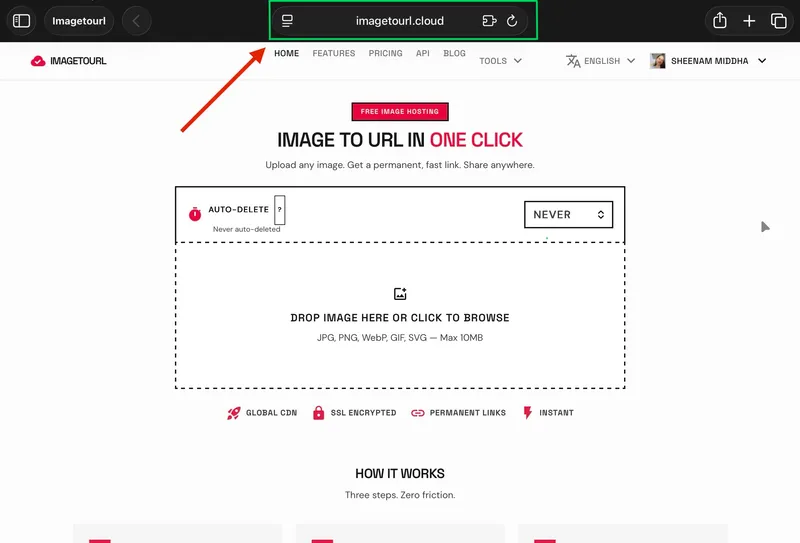
Step 1: Visit the Website
Go to imagetourl.cloud. No registration, no email, and no credit card needed.
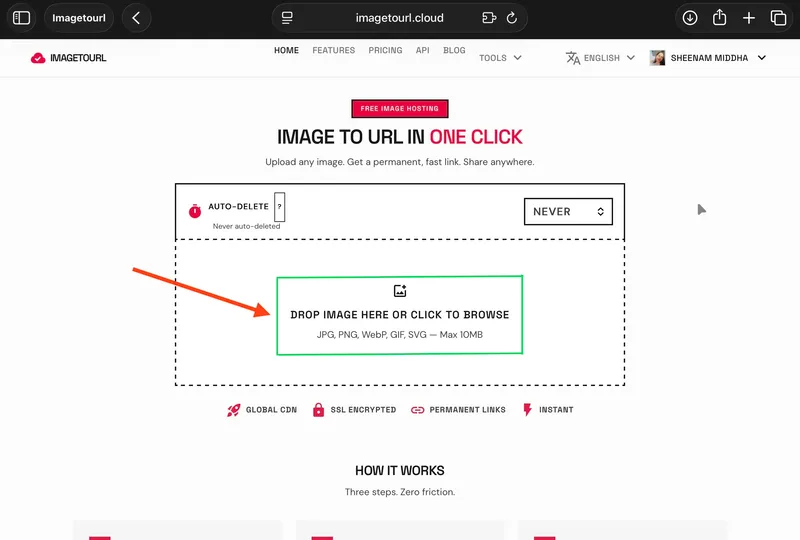
Step 2: Upload Your Image
Uploading an image is easy—just drag and drop it into the upload box or select it from your device. You can upload JPG, PNG, WebP, GIF, or SVG files, up to 10MB each.
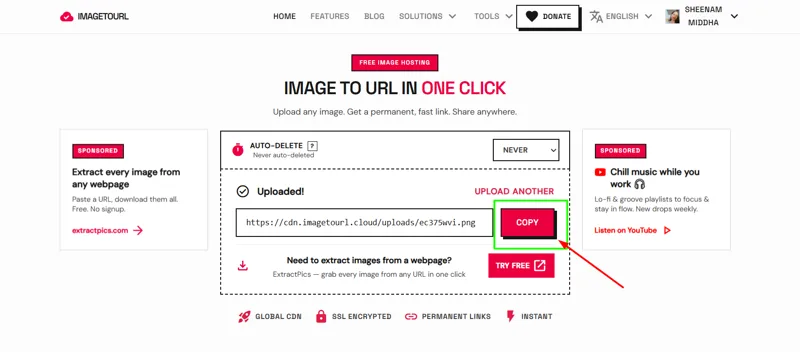
Step 3: Copy Your Direct Link
In just a few seconds, your image is processed and a direct link is ready to use. Simply click the “Copy” button and paste it wherever you need.
Step 4: Paste It Anywhere
You can use the direct image link anywhere—blogs, emails, forums, Markdown files, or <img> tags. It loads instantly and remains reliable over time.
Why ImageToURL Is Better Than Gallery-Based Hosts
Free image hosting platforms usually serve gallery pages filled with ads and clutter. ImageToURL.cloud does the opposite by providing a clean, direct image URL that you can use anywhere.
No Gallery Pages
All URLs point directly to your image file—no wrapper pages, no redirects, and no extra interface.
No Ads Around Your Image
Your audience sees only your image, without any third-party ads or distractions.
Hotlinking Allowed
You can use your ImageToURL images anywhere—no referrer blocks, no bandwidth limits, and no broken embeds.
Permanent Links
Your image URLs stay active over time, making them perfect for blogs, portfolios, and long-term documentation.
Global CDN Delivery
Powered by Cloudflare, your images are delivered from servers around the world, ensuring fast loading for every visitor.
SSL-Secured URLs
All links are served over HTTPS, so your images are safe to use on secure websites, apps, and emails.
Quick Comparison Table
Feature | Regular Link | Direct Link (ImagetoURL.cloud) |
|---|---|---|
Opens | Webpage | Image file |
Ads shown | Yes | No |
Works in <img> tag | No | Yes |
Works in email | Usually breaks | Always works |
Hotlinking | Often blocked | Always allowed |
Signup needed | Often yes | No |
Common Use Cases in Real Life
Choosing the right type of image link is important in many real-world situations.
Bloggers
Skip the media library—just upload your image to ImageToURL.cloud, get a direct link, and paste it into your post. Your images load faster for visitors worldwide.
Developers
Use direct image URLs in README files, API responses, and app assets. These links always return the image file, not a webpage.
E-commerce Sellers
On platforms like eBay or Shopify, direct links ensure product images load inline without redirecting customers.
Students and Teachers
Easily add images to tools like Google Docs, Notion, or presentations using a simple direct image URL.
Final Thoughts
The difference between direct and regular image links may seem small, but it makes a big impact in real use. Direct image links load faster, work across all platforms, and keep your content clean and professional. Regular links are only useful when you want users to view the full webpage along with the image.
For most use cases, direct image links are the smarter choice. With ImageToURL.cloud, you can turn any image into a clean, permanent, and shareable link in just one click. Try it today and make your image sharing faster and easier.
Frequently Asked Questions
What is a direct image link?
A direct image link is a web address that links directly to the image file, not to the webpage or gallery. Once you open it, all you have is the picture without any advertisements, no interface, and no additional page around the picture. These links typically terminate with such file extensions as .jpg, .png, or .webp.
Can I use a direct image link in an email?
Yes. The only type that is reliable within HTML emails is that of direct image links. Frequent gallery links tend to be broken or take the reader to a browser. ImageToURL.cloud provides you with direct URLs that will be correctly displayed in all emails.
Why do regular image links break when I embed them?
The links are regularly made towards a webpage, not towards the image file. Pasting a normal link into a tag or native Markdown gets the browser to attempt to show you a webpage as an image, which does not work. This is why your picture is not visible, but you can see the icon of the broken image.
Does ImageToURL provide direct links by default?
Yes. Instead of defaulting to gallery pages (as is the case with Imgur or ImgBB), ImageToURL.cloud provides you with a clean, direct image URL each time you upload. No additional actions to locate or duplicate the direct link.
Are direct image links from ImageToURL permanent?
Yes. All the links you create on ImageToURL.cloud are everlasting and do not expire. Your pictures remain alive and available both when you wrote a blog entry this day and a year later.
Is a direct image link better for website speed?
Yes. Direct image links are loaded quickly since the browser only loads the image. No additional HTML, JavaScript, or ad scripts are to be downloaded. This is particularly crucial in the case of blogs, e-commerce pages, and emails, where load time is crucial every second.