What Is an Image URL? A Complete Beginner’s Guide

Sheenam Middha
Writer

Table of contents
Have you ever tried to upload an image online and noticed that dragging it directly from your desktop doesn’t always work? That’s because most platforms don’t support local files — they need a proper image link.
An image URL is just a link to an image stored online. Instead of uploading the same file again and again, you can use that link to display the image anywhere, whether it’s a website, email, or documentation.
In this guide, you’ll learn what image URLs are, why they’re useful, and how you can create one for free using Imagetourl.cloud.
What Exactly Is an Image URL?
An image URL is a web address that points to an image file online. It usually looks something like this:
“https://cdn.imagetourl.cloud/uploads/hk1ye2cw.jpg”
Just paste the link into a browser, and the image will show up right away. Use that same link in HTML or Markdown, and the image will appear on your page — it’s that simple.
How Is It Different from a Regular Image File?
A normal image file (like .jpg or .png) saved on your device can only be seen by you. But when that same image is uploaded online, it gets a URL — and anyone with that link can access it.
It’s like the difference between keeping a photo in your drawer and putting it on a public board. Same picture, but now everyone can see it.
Why Would You Need an Image URL?
There are many situations where using a direct image link is more useful than relying on a local image file.
1. For Websites and Blogs
If you manage a website or write blog posts, image URLs are essential for showing images. Whether it’s WordPress, Wix, or a custom HTML page, images are displayed using links. Without a proper hosted URL, your images simply won’t be visible to users.
2. For Social Media and Messaging
On many platforms, you can use an image URL to show a preview or embed an image. It’s useful for sharing product images, memes, or design mockups on apps like Discord, Slack, WhatsApp Business, or forums.
3. For Developers and Designers
Image URLs are widely used by developers in code. Whether you're creating an app, documenting an API, or testing a front-end layout, using hosted images ensures they load consistently without issues.
4. For Email Campaigns
Most email clients struggle with large attachments. With image URLs, you can add images to your newsletters and marketing emails without making them heavy or slow to load.
How to Create an Image URL Using ImageToURL.cloud
Creating your own image URL with Imagetourl.cloud takes less than a minute. Here’s how:
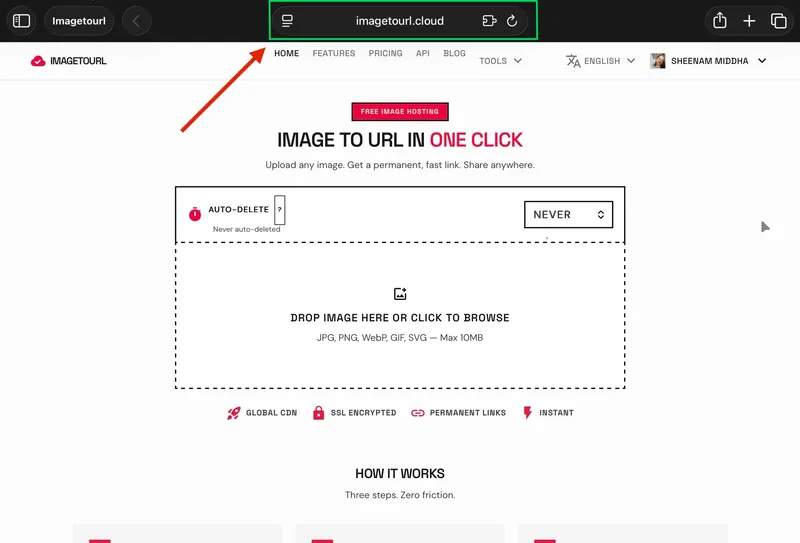
Step 1: Go to ImageToURL.cloud
Visit imagetourl.cloud in your browser. No sign-up or account is required.
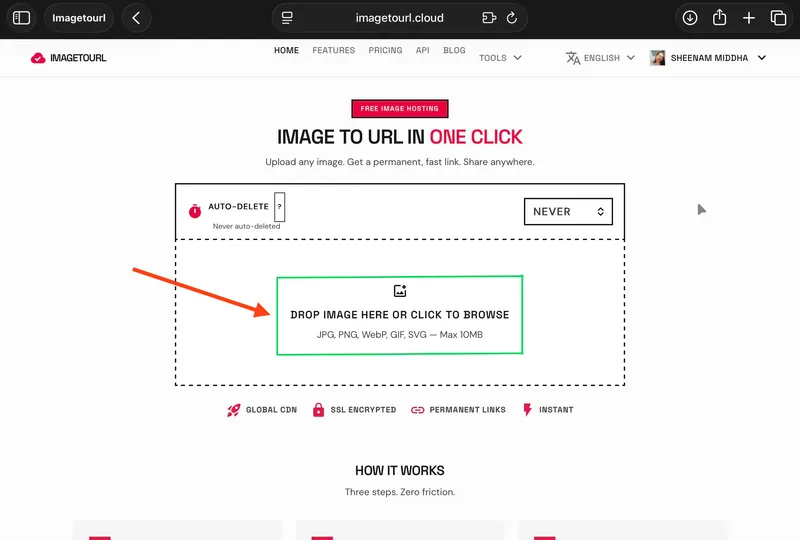
Step 2: Upload Your Image
Just drag and drop your image into the upload box, or choose it manually. It supports JPG, PNG, WebP, GIF, and SVG files up to 10MB.
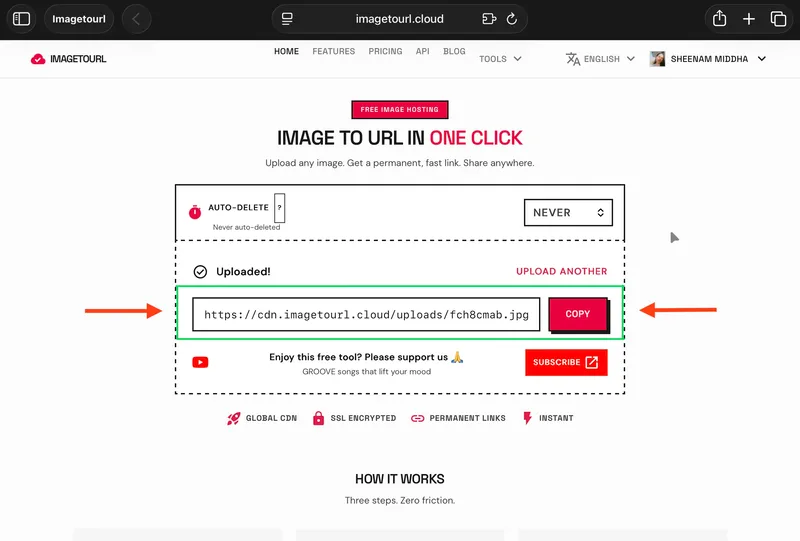
Step 3: Get Your Image URL
Once your image is uploaded, you’ll receive a permanent link. You can use it as a direct URL, an HTML <img> tag, or a Markdown embed—whatever fits your needs.
Step 4: Use It Anywhere
Just copy the link and use it in your blog, email, code, chat, or social media. Since the image is served via a global CDN, it loads fast for users everywhere.
What Makes ImageToURL.cloud Different?
Imagetourl.cloud isn’t the only option out there, but it stands out as a reliable choice for both beginners and professionals.
No Signup Required
You don’t need to create an account or provide your email—just upload your image and you’re ready to go. This makes it one of the fastest ways to get an image URL.
Permanent Links
With Imagetourl.cloud, your image links don’t expire like they do on many free platforms. So you don’t have to worry about waking up to broken images on your site.
Global CDN Delivery
All images are delivered through a content delivery network (CDN), ensuring they load quickly no matter where your audience is located—whether in New York, Lagos, or Mumbai.
Secure by Default
Images are delivered over HTTPS with SSL encryption, keeping your data secure. They’re also stored on Cloudflare’s encrypted servers, so your files stay protected.
Multiple Output Formats
After uploading, you can copy your image link in three formats—a plain URL, an HTML snippet, or Markdown. This saves time and makes it simple to use your image anywhere.
Conclusion
An image URL is simply a web address of an image stored online. It allows you to easily share, view, and embed images across websites, apps, emails, and chats without dealing with file attachments.
Tools like Imagetourl.cloud make the process quick and hassle-free. In just a few seconds, you can turn your image into a shareable link—no sign-up or complicated steps required.
Frequently Asked Questions
1. Do image URLs expire?
It depends on the hosting service. On imagetourl.cloud, the free-tier connections are permanent. Other websites will remove pictures after a specified duration; hence, always read the terms.
2. Can I use an image URL in Google Docs or Notion?
Yes, the majority of current applications that allow embedding of images will take a direct image URL. All you need to do is paste the link where you would like the image to be.
3. Are my uploaded images public?
Yes, the image can be seen by anyone, provided they have the URL. Do not post any sensitive or personal photos to any image hosting service.
4. What file types are supported?
Imagetourl.cloud accepts JPG, PNG, WebP, GIF, and SVG. The free uploads have a maximum file size of 10MB.