Best Free Image Hosting Sites in 2026 + Image to URL Tools

Dhananjay Kumar Nirala
Writer
Table of contents
For bloggers, content creators, and website owners, choosing the right free image hosting solution can make a real difference. The way your images are hosted affects website speed, user experience, and even your search visibility on Google. If images load slowly, visitors often leave within seconds—which can hurt engagement and conversions.
Many people simply upload images directly to their own server, but over time that can slow down a website and use extra hosting resources. That’s why exploring the best image hosting sites or using an image to URL tool can be a smarter option. Some platforms are beginner-friendly and easy to use, while others offer advanced features for developers and power users.
If your goal is to quickly upload an image and generate a direct image link, an Image-to-URL tool might be the simplest and fastest solution. In this guide, we’ll explore the top free image hosting options and help you choose the one that fits your needs best.
Free Image Hosting Sites: What They Are and How They Work
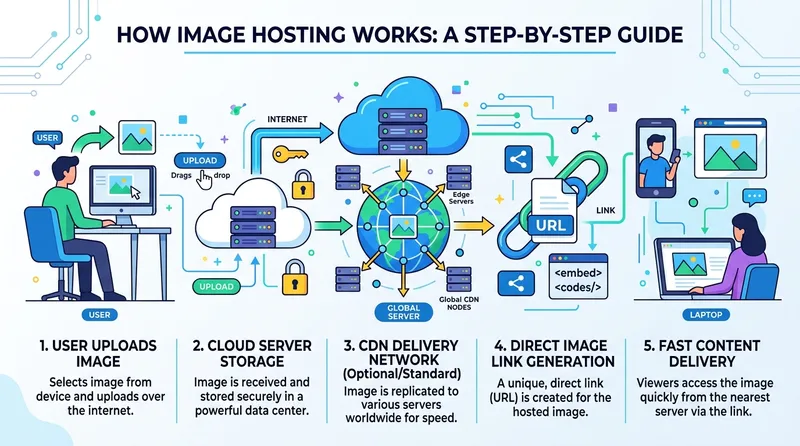
Free image hosting sites work by storing your images on secure servers and giving you a shareable URL that you can use anywhere online. Once you upload an image, the platform hosts the file for you, so you don’t need to use your own web server or consume your website’s hosting space.
Most of the best image hosting sites use a CDN (Content Delivery Network), which helps deliver your images from the server closest to your visitors. This improves loading speed and creates a better experience for users across different locations.
On free plans, many platforms offer features like direct image links, image embedding, and basic sharing options. However, storage limits, upload rules, and account requirements can vary from platform to platform. Some services require sign-up, while others allow instant uploads with no registration.
Choosing the right free image hosting platform often comes down to balancing speed, storage, ease of use, and sharing features. Now, let’s explore the top image hosting sites you can use today.
Top 10 Free Image Hosting Sites
1. ImagetoURL.cloud
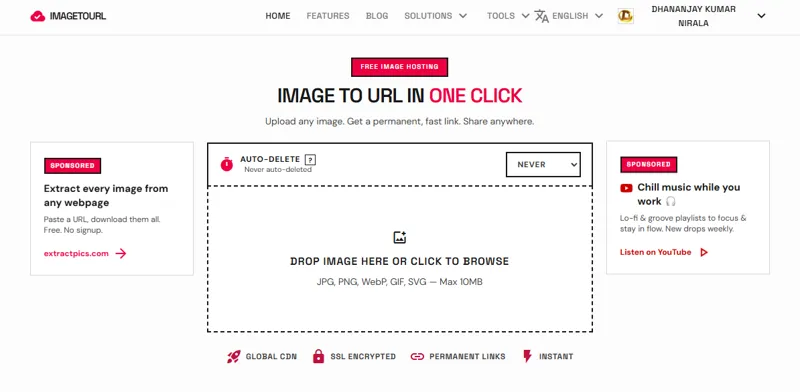
ImagetoURL.cloud is a dedicated image to URL platform built for users who want fast image sharing without extra steps. You can upload an image and get a direct image link instantly—no registration, no unnecessary setup, and no cluttered interface.
This platform is especially useful for bloggers, developers, and content creators who need free image hosting with reliable hotlinking support. Instead of storing images on your own server, the files are hosted externally and delivered through a CDN, helping pages load faster and reducing storage usage on your website.
If your goal is to quickly upload an image and generate a permanent, shareable URL, ImagetoURL.cloud offers one of the simplest solutions available.
Pros | Cons |
No need to sign up or log in | No image dashboard or library |
Allows multiple or batch uploads | No discovery or social media features |
Creates permanent, lifetime links | Only supports image files, not video or audio |
Supports most image formats | No image editing or manipulation tools |
Decreases blogging server load and enhances search engine friendliness | Not as many users as more established services |
2. Imgur
Imgur is one of the most recognized free image hosting platforms on the internet. It first became popular for image sharing in online communities and later grew into a large social platform with public posts, albums, and viral content.
The platform is simple to use and works well for quickly uploading and sharing images with others. It’s a good option for creators who want visibility and community engagement. However, if you specifically need private hosting, permanent direct image links, or reliable hotlinking for websites and blogs, Imgur may not always be the best fit because embedding rules and usage policies can change over time.
For public image sharing, though, Imgur remains one of the most popular choices.
Pros | Cons |
Free unlimited storage | Only limited or no hotlinking on the free plan |
Viral content and a large user community | Images can be made public by default |
Can organize photos in albums and galleries | Ads are present in the free service |
Does not require an account | Not embedded, based on albums |
Supported and familiar globally | Previous policy changes have resulted in the purging of anonymous old images |
3. ImgBB
ImgBB is a fast and beginner-friendly free image hosting platform designed for quick uploads and instant sharing. One of its biggest advantages is that users can upload images and get a direct image link or hotlink URL without creating an account.
Because of its clean interface and quick upload process, ImgBB is popular among bloggers, forum users, developers, and website owners who need reliable image sharing. It also works well for embedding images in blogs, websites, online communities, and discussion forums.
If you’re looking for a simple image to URL solution with fast performance and easy sharing, ImgBB is one of the most convenient options available.
Pros | Cons |
No account required for simple uploads | Ads on the free plan |
Direct embed and hotlink support | No bulk upload feature |
Permanent hosting with no expiry | A few ways to organize images |
Quick uploads and easy-to-use interface | No image editing or optimization tools |
Option to set links to expire | Ample but not technically unlimited storage |
4. PostImages
PostImages is a popular free image hosting platform known for its simple and anonymous upload system. Users can upload images without creating an account and instantly receive direct image links that are easy to share across websites, blogs, and online forums.
One of its most useful features is hotlink support, which makes it easy to embed images directly into blog posts, forum discussions, or web pages. The platform also provides an optional delete link, giving users more control over their uploaded images.
If you need a quick image to URL solution with anonymous uploads and easy image sharing, PostImages is a strong choice for bloggers, developers, and forum users.
Pros | Cons |
No registration or login required | The maximum image width is 900px on the free plan |
Offers "delete" links to protect your privacy | Lacks image management or library |
Hotlinking support built-in | Simple but limited user interface |
Simple, clutter-free interface | No speed optimizations via CDN |
No time limit on uploaded images | No API or integration available |
5. FreeImage.host
FreeImage.host is a lightweight free image hosting platform built for quick and hassle-free image sharing. Users can upload an image without creating an account and instantly receive direct image links, embed codes, and hotlink URLs.
Its simple interface makes it a good option for people who want to share images quickly in forums, chat apps, blogs, or websites without going through extra setup steps. The upload process is fast, and the platform focuses on speed and ease of use rather than complex features.
If your main goal is to upload an image and get a shareable image to URL link within seconds, FreeImage.host is a practical choice.
Pros | Cons |
No need to register | Simple and uncluttered interface |
URLs created after upload | Lacks image management features |
Allows hotlinking and embedding | No API or developer integrations |
Fast and lightweight with no bloat | No guarantees of its future or uptime |
Free with no storage limits advertised | No bulk upload support |
6. Cloudinary
Cloudinary is one of the most advanced platforms in the image hosting and media management space. Unlike basic free image hosting services, Cloudinary offers much more than simple image uploads.
The platform can automatically optimize images, resize them for different devices, convert file formats, and deliver content through a global CDN for faster loading speeds. This helps improve website performance and user experience across desktop and mobile devices.
Because of its powerful automation features, Cloudinary is widely used by developers, businesses, and web applications that need scalable image hosting, image optimization, and reliable media delivery. If you need advanced control instead of just a basic image to URL tool, Cloudinary is a strong option.
Pros | Cons |
Robust image manipulation and optimization API | Needs account creation and configuration |
CDN-powered delivery for speedy load times | Maximum 25GB monthly bandwidth on the free plan |
Supports both images and videos | Too much for small blogs/personal sites |
Easy to use for developers, all languages supported | Harder to set up than basic hosts |
Free to use for small apps | Can be expensive for heavy traffic |
7. Flickr
Flickr is one of the oldest and most trusted photo hosting platforms, widely used by photographers, designers, and visual creators. Unlike basic free image hosting services that focus only on sharing links, Flickr is built for storing, organizing, and showcasing high-quality images.
Users can create albums, organize images into collections, and share their work with a larger creative community. This makes it a strong choice for photographers who want both image storage and portfolio-style presentation.
If your goal is to build an online photo collection or showcase creative work instead of simply generating an image to URL link, Flickr offers much more flexibility and presentation features.
Pros | Cons |
Free for up to 1,000 photos with great quality storage | Sign-up is required to use the service |
Excellent organization features - albums, tags, collections | Free plan limited to 1,000 photos |
Photography community to explore | Lacking hotlinking and blog embed options |
Allows direct image links for embedding | Social networking emphasis may be overkill |
Old and established service | Paid plan needed for unlimited storage |
8. ImageShack
ImageShack is a well-known image hosting platform that has been part of the web for many years. Over time, it has evolved from a basic free image hosting service into a more professional platform designed for users who need reliable image storage and performance.
The platform offers CDN-based image delivery, helping images load faster across different regions and devices. It also includes more advanced hosting features, which makes it suitable for professionals, businesses, and users managing larger media libraries.
While it may not be the simplest image to URL tool for quick anonymous uploads, ImageShack can be a strong option for users looking for a more premium and feature-rich hosting experience.
Pros | Cons |
Fast image load times due to global CDN | Primarily a paid service - 30-day trial free |
Reliable and powerful hosting | Impractical for free hosting in the long run |
History and reputation of a mature provider | Not ideal for light or infrequent use |
Allows direct links and hotlinking | Requires account signup |
Clean, professional interface | Not as good as the newer free services |
9. Bunny.net
Bunny.net is not a traditional free image hosting platform. Instead, it focuses on CDN delivery and cloud storage, making it a strong choice for developers, businesses, and websites that need fast global content delivery.
The platform allows users to store images and other media files while delivering them through a high-speed global CDN. This helps improve loading speed, website performance, and scalability—especially for websites with heavy traffic or large media libraries.
Because setup can be more technical compared to basic image to URL tools, Bunny.net is usually better suited for developers or advanced users. However, if speed, reliability, and scalable image hosting matter most, Bunny.net is an excellent option.
Pros | Cons |
Very fast global content delivery network (CDN) with locations around the world | More complicated to set up than single-click hosts |
Low cost after the free trial period | No free plan for long-term use - pay as you go |
Can handle large websites and applications | Not for amateurs or non-techies |
Affordable egress charges relative to other providers | No community or sharing features |
Enterprise-class uptime and reliability | Needs to be set up to publicly serve images |
10. Cloudflare R2
Cloudflare R2 is a powerful cloud storage solution built for developers, startups, and businesses that need scalable image hosting and file delivery at a larger scale. Unlike traditional free image hosting sites, Cloudflare R2 is an object storage platform designed for performance, flexibility, and global delivery.
It supports S3-compatible storage, making it easier for developers to integrate with existing tools and workflows. One of its biggest advantages is fast content delivery through Cloudflare’s global network, which helps images and media files load quickly across different regions.
Because it requires some technical setup, it may not be ideal for beginners who simply want an image to URL tool. However, for developers who need high-performance image hosting, scalable storage, and reliable global delivery, Cloudflare is one of the strongest options available.
Pros | Cons |
No egress charges (unlike AWS S3 and others) | Must be configured by a developer |
10GB free, affordable growth | Not user-friendly for non-developers or casual users |
Fast network with global access via Cloudflare | No image management interface |
S3-compatible API for easy integration | Requires a Cloudflare account and setup |
Reliable enterprise-grade platform | No sharing, discovery, or community features |
How to Choose the Best Image Hosting Site for Free
Choosing the best free image hosting platform depends on what you actually need. There isn’t one service that works perfectly for everyone. Some users need quick uploads and direct image links, while others need advanced features like CDN delivery, image optimization, or large-scale storage.
If you're a blogger or website owner, focus on loading speed, hotlink support, and reliable image delivery. If you're sharing images on forums, chat apps, or social media, a simple image to URL service may be all you need. Developers and businesses may prefer platforms with more control, API access, and scalable cloud storage.
If you want something simple, fast, and beginner-friendly, ImagetoURL.cloud can be a practical option for generating shareable image links without unnecessary setup. The right choice ultimately depends on your workflow, technical needs, and how you plan to use your images.
1. Do you need it without signing up?
If you don't want to register, choose ImagetoURL.cloud or ImgBB. These allow you to upload and get a link immediately, no account required.
2. Will you embed images on a blog or website?
If so, check if the tool supports hotlinking (not all do). Your best options for direct links are ImagetoURL, ImgBB, and PostImages.
3. Are you a developer or building something?
Need API, image optimization, or high volume? Use Cloudinary or Cloudflare R2. These are more technically oriented and have more control than hosts.
4. How long do you need the images to remain?
If you want images to remain online indefinitely, steer clear of free accounts of paid services like ImageShack. Use services like ImagetoURL or ImgBB that specifically claim to have non-expiring links.
5. How many images will you upload?
For occasional use, any free service will do. But if you share large volumes or have a popular website, select an option that scales well, such as Cloudinary or Cloudflare R2.
Conclusion
Choosing the right image hosting platform can have a bigger impact than most people expect. It affects website speed, user experience, image availability, and even long-term SEO performance. Broken image links, slow loading pages, or storage limits can create unnecessary problems over time, so selecting the right platform from the start matters.
There’s no single solution that fits everyone. Some users need advanced developer tools, while most bloggers, creators, and website owners simply want free image hosting, reliable direct image links, and an easy upload process.
If you’re looking for a simple image to URL solution without complicated setup, ImagetoURL.cloud can be a strong option. It offers fast uploads, shareable image links, and a clean experience for users who want to upload an image and use it anywhere online.
The best platform ultimately depends on your workflow—but speed, reliability, and ease of use should always be top priorities.
Frequently Asked Questions
What is the best free image hosting site with no signup?
The easiest is ImageToURL.cloud, where you can upload the image and get the link. No sign up, no passwords, no forms.
Can I use free image hosting sites for my WordPress blog?
Yes, the majority of free image hosting sites will create a direct link that you can copy into WordPress. ImageToURL.cloud is a good one to use as the links are permanent and do not expire.
What is an Image-to-URL.cloud tool, and how does it work?
An Image-to-URL.cloud tool turns your image into a link as soon as you upload the image. You receive a simple URL that you can then use in your blog posts, forums, emails, or even in your CMS's HTML editor.
Do free image hosting sites affect my website speed?
In fact, they boost it. Storing images elsewhere reduces the load on your server, improving the speed of your site and ranking it higher in Google.
Are the image links permanent on free hosting platforms?
Not necessarily - some hosts set links or images to expire or be removed if they're not used. ImageToURL.cloud provides permanent links that never expire.
Can I upload multiple images at once on these platforms?
Typical hosting services only support single uploads. With ImageToURL.cloud, you can upload multiple images at once to get multiple image links.